Open apps, switch windows, calculate, and run safe PC commands from one keyboard-first command bar. Common actions stay instant and local — and the words you use are remembered on your own PC, so you can find the thing you meant with fewer keystrokes.
Launch what you need, jump back into what you already opened, and turn common Windows actions into a single flow.
Find the right thing first
Search Start Menu apps, local files, and running windows in one ranking-aware result list. Open a URL directly or fall back to web search when nothing local matches.
Native search
invoice
Q3 invoice.pdf
Documents · Client
Enter to open
Control the active window
Snap, maximize, minimize, restore, close, or focus without leaving the flow. Common commands resolve on-device.
snap leftLocal
set volume to 40Local
half the screenLearned
> focus ChromeCloud AI
Teach it your shortcuts
Create quick links for any URL or file. Pass the rest of your query into a URL template for fast project and dashboard navigation.
TypeResult
gh reactgithub.com/react
docs invoiceOpen local file
Small tools, right where you need them
Run calculator expressions, copy the result, and return to recent clipboard text without breaking your train of thought.
CalculatorEnter to copy
= 1920 / 1.51280
Clipboard history
Meeting notes — Q3 planning
It learns the words you use for things — on your own PC
Open a file once and AskDesk remembers the words you typed to reach it. A week later, tax from last month still finds it — even when the name alone does not contain those words. A time reference narrows the result instead of becoming part of it, and every recalled row shows you the word it matched on. No cloud request, no quota, no wait.
The same memory covers commands. When a cloud request finally gets it right, AskDesk remembers that wording and the action it produced, and previews it locally next time. Commands that depend on what is open right now — a named window, a file path — still go to the model, because only it can read your live windows.
Never uploadedShows its matchOne-click erase in Settings
You typeRuns onAI quota
tax from last monthThis PCNever used
snap leftThis PCUnused
half the screenLocal memoryUnused
> focus ChromeCloud AICounts
A wrong guess never runs silently — every recalled result shows the word behind it, and every replay is previewed before it executes.
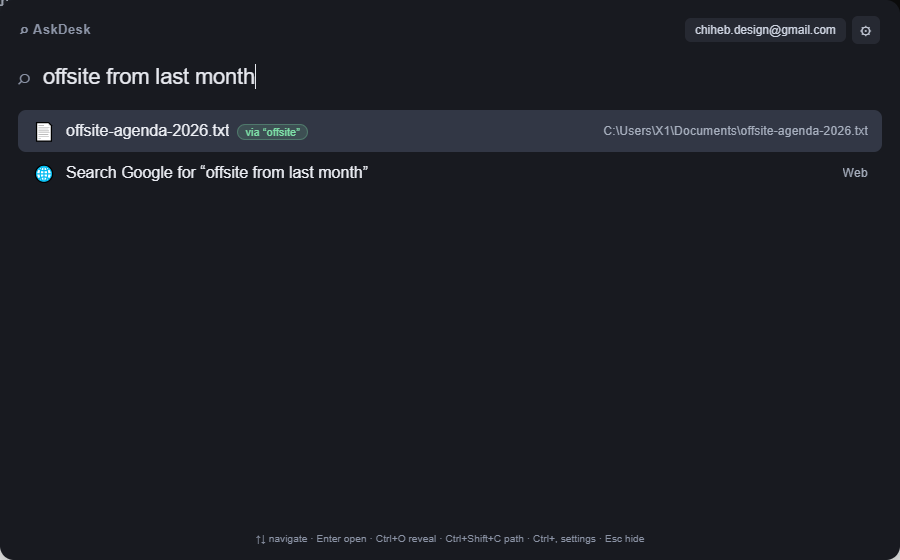
Actual AskDesk window. A filename search alone cannot answer this query; local memory can.
Real behavior, no model involved
A query your filename search cannot answer
The name offsite-agenda-2026.txt does not contain "from last month", and a plain filename search would return nothing for it. AskDesk still returns it, because the first time you opened that file you typed the word offsite.
The green via badge is the word it matched on, so a wrong guess is never silent. Nothing left the machine, no AI quota was spent, and the time reference narrowed the result instead of being searched for.
Runs on this PCZero AI quotaExplains the match
One rhythm
Summon. Type. Move on.
AskDesk is designed around one repeatable habit instead of another app to manage.
Alt+SpaceWorks from anywhere
01
Bring up the command bar
A lightweight always-on-top overlay appears over whatever you are doing.
02
Type the outcome, not the syntax
Search directly, use a common local command without a prefix, or add > when you want cloud AI.
03
Review only when it matters
Cloud AI shows a safe action preview before anything runs. Press Enter to confirm or Esc to cancel.
04
Type it your way, then type less of it
Open something once and the words you used are remembered on your PC. Later, a shorter or time-qualified query still finds it — locally, with no request, no quota, and no waiting on a model.
Local by default
Useful without turning your PC into a cloud app.
Local search and personal context
App and file search, Frequent items, the words you used to reach a file, quick links, calculator input, and clipboard history stay in local app storage on your device.
Cloud AI is explicit
Only requests sent with > use cloud AI. The request and a limited list of visible window titles may be processed to resolve the intended safe action.
Local memory stays on your device
AskDesk stores the words you used to reach a file, plus the command phrasings that worked, in local app storage so both can resolve instantly later. Nothing is uploaded, a recalled result shows the word it matched on, and Settings › Data & privacy erases both with one click.
Preview before execution
Model output is validated against a strict action registry. AskDesk shows the proposed action and waits for confirmation.
Simple pricing
Keep the launcher free. Upgrade the cloud AI.
Core search and local Windows actions stay free. Pro removes the cloud AI request limit.
Free
For a faster everyday Windows.
Forever
$0forever
App, file, URL, and open-window search
Calculator, clipboard history, and local commands
10 custom quick links
3 saved workflows
Remembers your words — finds the file you meant, no AI quota
No. App and file search, running-window switching, calculator, quick links, clipboard history, and common local commands work without signing in. An account is required for cloud AI and Pro billing.
What can the cloud AI actually do?
It maps plain English to a strict set of Windows actions such as snapping, focusing, minimizing, or closing a window, setting volume, locking the PC, launching an app, or opening a local path. It cannot return arbitrary shell commands.
What data leaves my computer?
Local search, Frequent items, the words you used to reach a file, quick links, clipboard history, and the command phrasings AskDesk has learned all stay on your device. When you request cloud AI with >, your request and a limited set of visible window titles may be sent to resolve the intended action. The proposed action is shown before execution.
What does AskDesk learn about me?
Two things, both on your PC. First, the words you typed when you opened a file, so a later shorter or time-qualified query can find it again — filler words and time words like last or today are never stored, and a recalled row shows the word it matched on. Second, the command phrasings that already worked: after a cloud request resolves successfully, that wording replays locally with no new request and no quota. Only actions on the active window or a value you typed can replay — anything naming a specific window or file path goes back to the model, because that depends on what is open right now. Every replay is previewed before it runs, and both memories are erased from Settings › Data & privacy.
Which Windows versions are supported?
AskDesk supports 64-bit Windows 10 and Windows 11. The Microsoft Store package handles installation and updates.
Can I create my own shortcuts?
Yes. In Settings, create a keyword for a URL or local path. A target containing {query} can use the rest of your launcher input, such as gh react.
How do I install or remove AskDesk?
Install it from the Microsoft Store. AskDesk lives in the system tray and uses Alt+Space when summoned. Uninstall from Windows Settings → Apps.
Put your Windows one shortcut away.
Install AskDesk, press Alt+Space, and keep moving.